
SaaS cost grow—without financial control

Why do SaaS costs grow so fast?
Based on Gartner research, the global SaaS market is growing fast. End-user spending is expected to rise by twenty percent, reaching around $315 billion by early 2026. This momentum comes mainly from Generative AI built into applications and from independent software vendors modernizing their solutions for SaaS-based consumption models.
SaaS has quietly become one of the least controlled cost categories in IT. Unlike traditional IT investments, SaaS costs grow incrementally, spread across teams and renew automatically. Over time, spend increases without clear ownership or financial review.
Today, SaaS costs typically:
- Grow gradually and often unnoticed
- Sit across dozens or hundreds of vendors
- Get paid by multiple teams, cost centers or credit cards
- Renew automatically, without structured approval
As a result, many organizations can’t clearly answer:
- How much do we actually spend on SaaS?
- Which business units drive which costs?
- How reliable are our SaaS forecasts?
- Where does savings potential exist?
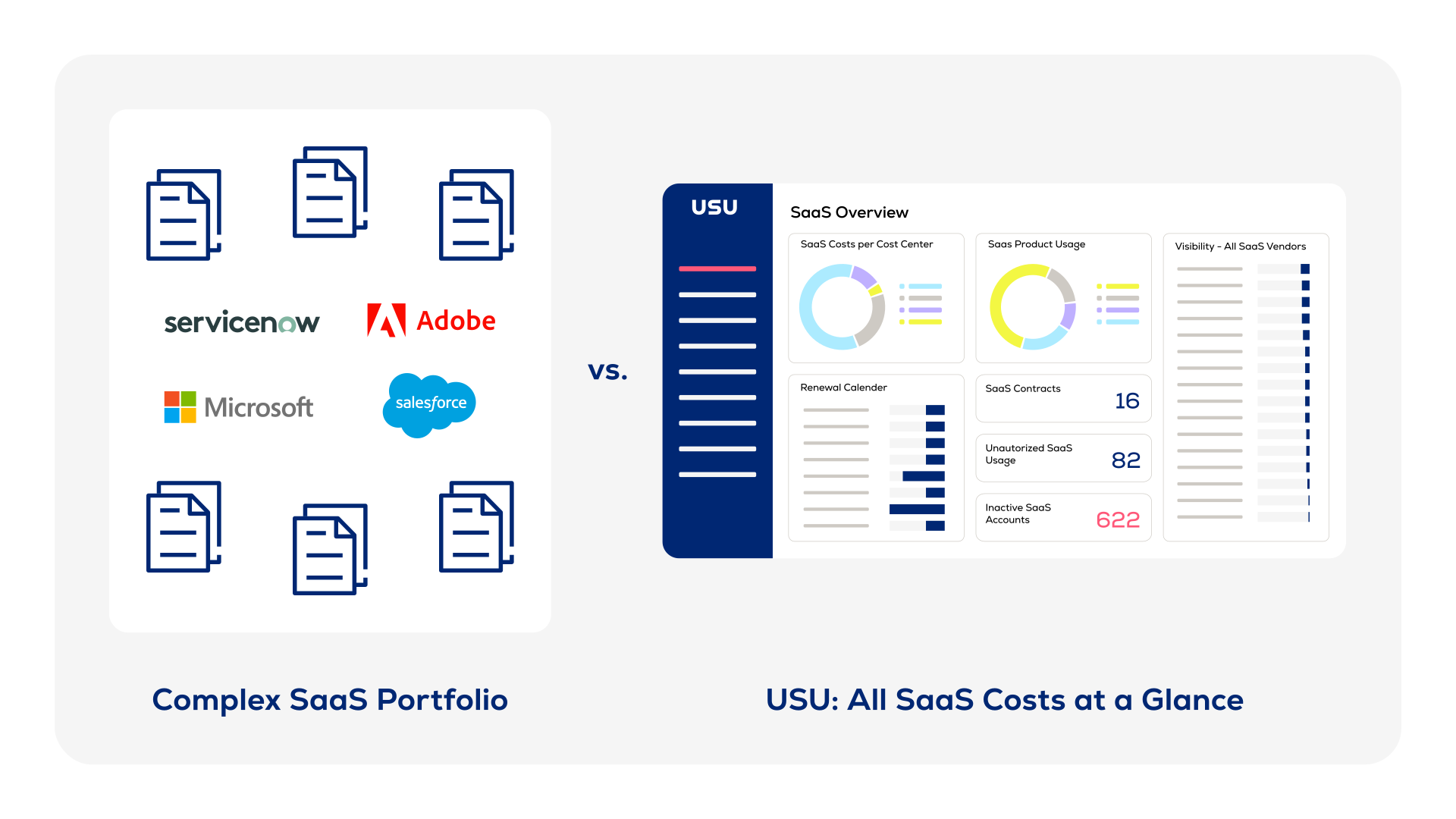
The financial risk of doing nothing
Without centralized SaaS discovery and cost visibility, Finance teams operate with incomplete data and limited control. What starts as decentralized tool adoption quickly turns into structural financial risk. Over time, this affects budgets, forecasts and the quality of strategic decisions.
Uncontrolled OPEX growth
SaaS spend rises year over year—often without a proportional increase in business value.
Examples:
- Licenses continue to renew even when teams shrink or tools are no longer actively used
- New SaaS tools get added on top of existing ones, increasing spend without replacing older contracts
- Incremental price increases compound across dozens of vendors, unnoticed in annual budgets
Limited financial accountability
When costs can’t be allocated, showback and chargeback become unreliable or impossible.
Examples:
- Shared SaaS tools remain booked as central IT costs, with no cost ownership at business unit level
- Showback or chargeback models fail because usage and license data is incomplete or unreliable
- Business units request additional budget without visibility into their existing SaaS consumption
Poor decision-making
Without reliable data, financial decisions rely on assumptions instead of facts.
Examples:
- Renewals are approved without knowing actual usage or value delivered
- Vendor consolidation initiatives fail because overlapping tools can’t be quantified
- Forecasts miss upcoming renewal peaks, leading to budget overruns or last-minute negotiations
In many organizations, SaaS becomes a black box inside IT spend—visible as a total cost, but opaque where it matters most.
Would you like to learn more about how we help our customers to discover SaaS and track all costs in one powerful dashboard?


What CFOs need to see—and why it’s hard today
Effective SaaS cost governance isn’t about cutting tools. It’s about making costs visible, allocatable and predictable.
Finance leaders need reliable answers to questions like:
- How much do we spend on SaaS in total—and where?
- Which business units drive which costs?
- What percentage of licenses are actively used?
- Where do we have overlapping or duplicate tools?
- How accurate are our SaaS spend forecasts?
- Which costs are shared and which are avoidable?
Without a structured approach, these questions are difficult—if not impossible—to answer consistently.
Apply FinOps Thinking Beyond Cloud Infrastructure
Many organizations already apply FinOps practices to cloud infrastructure. SaaS, however, often remains excluded.
Applying FinOps principles to SaaS means:
- Cost transparency across the organization
- Clear allocation and accountability
- Unit-economics thinking, such as cost per user or function
- Data-driven conversations between Finance, IT and the business
This is not a technical exercise. It is a financial control capability.
From fragmented spend to financial control
With a centralized SaaS Management platform, Finance gains:
- A consolidated view of all SaaS costs
- Reliable data for allocation and forecasting
- Visibility into unused licenses and renewal risks
- A factual basis for budgeting and optimization
This enables:
- Stronger budget discipline
- Fewer renewal surprises
- Clear accountability across business units
Start with a fact-based SaaS business case
Before discussing tools or investments, many organizations start with one simple question:
What would our SaaS business case look like with full cost transparency?
A short assessment helps quantify:
- Current SaaS spend visibility gaps
- Cost allocation challenges
- Realistic efficiency and savings levers
This creates a fact-based foundation for financial decision-making—even before a budget is formally assigned.
.svg)
USU helps organizations create financial transparency across their SaaS landscape—so Finance teams can regain control, predictability and accountability. Learn more about our SaaS Management platform and reach out to our USU experts for a non-binding consultation.
Get in touch with an expert
Do you have questions about our offering? A quick call can be way more helpful than a long email chain. Talk to one of our experts to explore our products and see them in action.

Melisa Mujic
ITM Community Developer
We are here to help
Send us a message
No matter if you like to partner with USU or just have a few questions.
Frequently asked questions
What does cost allocation mean in SaaS management?
In SaaS Management, cost allocation means assigning SaaS spend to the right owners inside the organization—typically by department, team, project, cost center or even individual users.
Instead of seeing one aggregated bill like “$120,000 for SaaS,” cost allocation answers questions such as:
-
Which department is responsible for this tool?
-
How much does Marketing spend on SaaS vs. Sales or IT?
-
Which users or teams drive the highest costs?
-
Which applications are paid for but barely used?
How can cost allocation be enabled in SaaS management?
Cost allocation in SaaS management is enabled by connecting three data layers and keeping them in sync:
-
Financial data
Import invoices, contracts and payment data from accounting systems, credit cards or procurement tools. This defines what is paid and how much. -
Usage and identity data
Connect SaaS applications to retrieve users, licenses and activity. This shows who actually uses what and at what level. -
Organizational context
Enrich users and subscriptions with business attributes such as:-
Department
-
Cost center
-
Team or project
-
Business unit
-
What are the benefits of SaaS cost allocation?
SaaS cost allocation turns opaque subscription spend into a transparent, controllable cost category. The key benefits are:
-
Full transparency – See exactly which teams, projects or users drive SaaS costs. No more “black box” spend.
-
Clear ownership – Every application and license has a business owner, reducing waste and finger-pointing.
-
Better cost control – Identify unused licenses, over-provisioning and redundant tools at a granular level.
-
Fair chargeback and showback – Allocate costs accurately to departments or projects, creating cost awareness and accountability.
-
Stronger renewal negotiations – Use real usage and cost data to right-size contracts and improve vendor leverage.
-
Finance–IT alignment – Finance gains reliable numbers, IT gains operational context—both work from the same source of truth.
-
Data-driven decisions – Leaders can evaluate tool value based on cost per user or team, not just total spend.
In short, SaaS cost allocation transforms SaaS from an uncontrolled overhead into a strategically managed business investment.
How can I make predictions on future SaaS costs?
To predict future SaaS costs, you need to move from static invoices to a model that combines usage trends, contract data and business growth signals. In practice, this works in three layers:
-
Build a clean cost baseline
Aggregate all SaaS spend in one place: subscriptions, invoices, renewal dates, contract terms and pricing models. This defines your current “run rate” per tool, team and user. -
Add usage and growth signals
Connect each application to capture:
-
Active users and license types
-
Adoption trends over time
-
New joiners and leavers (from HR or IAM)
-
Team growth plans or headcount forecasts
This shows how demand actually evolves.
-
Apply forecasting logic
With this data, you can model scenarios such as:
-
“What happens if Sales grows by 20%?”
-
“What if we downgrade 30% of inactive licenses?”
-
“How will renewals affect next year’s budget?”
How can I automate my cost forecasting through a SaaS Management tool?
SaaS Management tools automate cost forecasting by turning scattered subscription data into a continuously updated prediction model. Instead of building spreadsheets, the platform does the heavy lifting in four steps:
-
Centralize all SaaS spend
The tool aggregates invoices, contracts, renewal dates and pricing models across all applications. This creates a real-time baseline of your current run rate per app, team and user. -
Connect usage and identity data
By integrating directly with SaaS apps, HR and IAM systems, the platform tracks:
-
Active users and license types
-
Usage trends over time
-
Joiners and leavers
-
Team and department assignments
This links cost to real demand.
-
Apply automated forecasting logic
The system uses historical growth, usage patterns and contract terms to:
-
Project future spend per application
-
Forecast department-level budgets
-
Model renewals and price changes
-
Detect budget risks early
Many tools let you simulate scenarios like:
-
“What if headcount grows by 15%?”
-
“What if we remove all inactive licenses?”
-
“What happens after the next renewal?”
-
Keep forecasts continuously up to date
Because data flows in automatically, forecasts adjust in real time as:
-
New users are added
-
Teams change size
-
Licenses are reassigned
-
Contracts approach renewal
This turns forecasting from a quarterly exercise into a living, automated model—so Finance and IT can plan proactively and avoid surprise SaaS costs.
How can processes be automated in SaaS management?
You can automate SaaS Management by connecting your core systems and defining rules that turn insights into actions. Modern SaaS tools act as an orchestration layer between Finance, IT, HR and Procurement.
Key automation areas:
-
Discovery & Inventory
Automatically detect new SaaS apps via SSO, browser extensions, finance systems or API connections. Every tool is captured without manual audits. -
User Lifecycle Automation
Integrate with HR or IAM to trigger workflows:
-
New hire → assign standard apps
-
Role change → adjust licenses
-
Leaver → revoke access and reclaim licenses
This prevents over-licensing and security risks.
-
License Optimization
Set rules such as:
-
“Flag users inactive for 30 days”
-
“Downgrade unused premium licenses”
-
“Reclaim access after X days of inactivity”
Actions can be automated or sent for approval.
-
Renewal & Contract Management
Automate alerts and workflows:
-
Notify owners before renewals
-
Highlight underused licenses
-
Suggest right-sizing before negotiation
-
Cost Allocation & Reporting
Automatically assign spend to departments, teams or cost centers and generate:
-
Showback/chargeback reports
-
Budget forecasts
-
Department-level dashboards
-
Governance & Policy Enforcement
Enforce rules like:
-
“Only approved apps can be purchased”
-
“Every app needs a business owner”
-
“All tools must have a renewal date”
Automation turns SaaS Management from reactive tracking into a proactive control system—reducing waste, preventing risk and keeping spend aligned with real business needs.


