- Home
- saas management
- salesforce and saas cost explosion
Salesforce and the SaaS cost explosion

Introduction
Software a s a Service (SaaS) i s quickly becoming the only way t o access your most important software applications. This change benefits customers significantly because they can take advantage of a flexible spend subscription model and get the complete package - hardware, software, and service! It couldn't be easier!
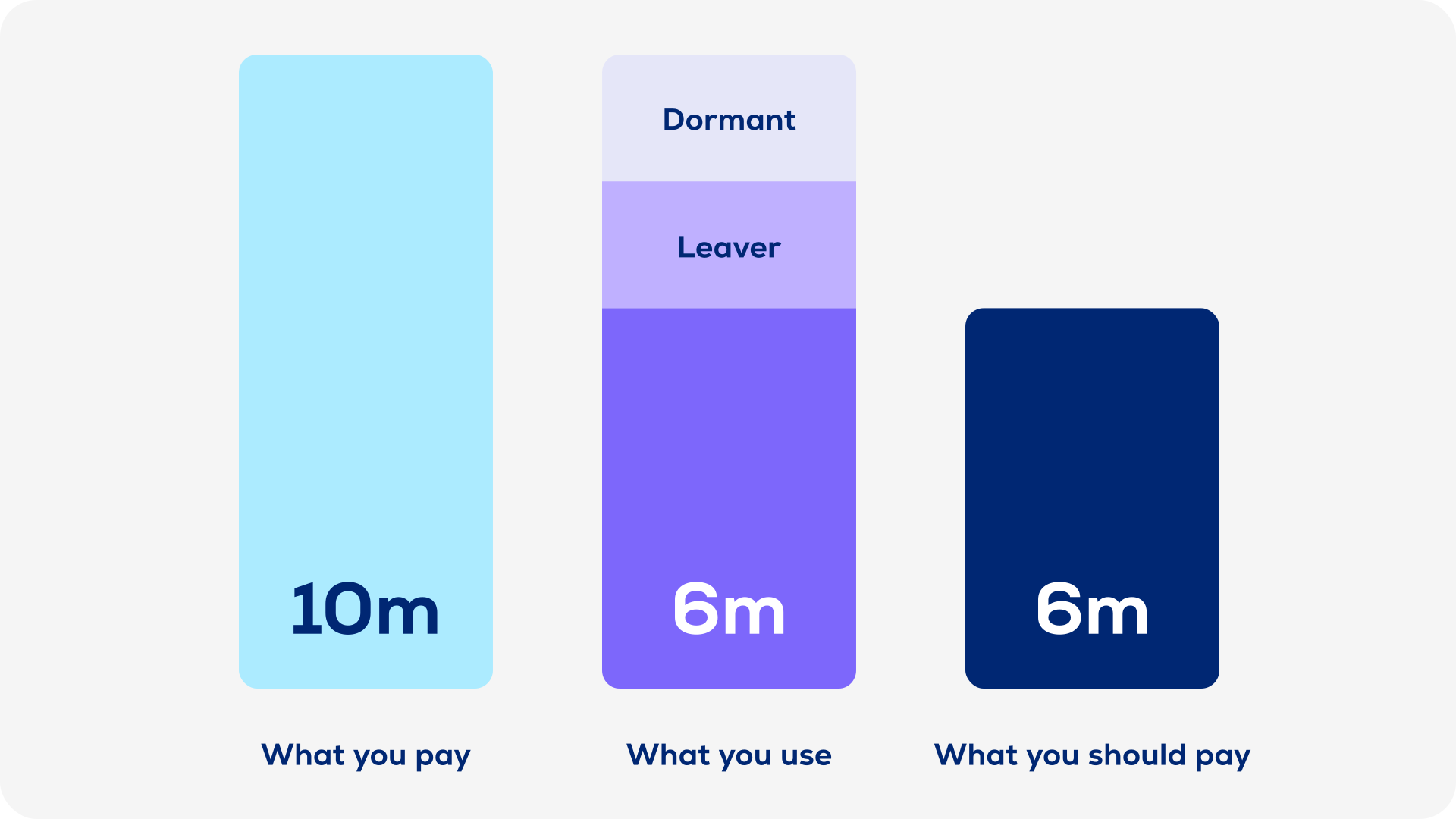
But organizations are i n for a shock once they start looking at their overall SaaS spend and compare it to their actual usage. What at the start appeared to b e an easy and inexpensive business solution, is suddenly revealed to be a hard-to-control budget buster. The contract terms are more difficult and more inflexible than advertised, and customers are left wondering whether their clouds only bring storms instead o f silver linings.
Yet despite this, the "SaaS Spend Surprise" hasn't arrived at the C-level yet. Organiza-
tions are still happily spending o n Saas products without developing ways to track their real usage needs and maximize their available licenses.
This white paper will take a deep dive into the Saas spend challenge based o n real
experiences with Salesforce. We'll look at three ways the spend surprise might occur in your own organization, and then discuss the four steps you can take control of your SaaS spend.
Two perspectives of SaaS spend
This white paper merges two professional perspectives: those of the customer (Jochen Hagenlocher) and the solution vendor (Dr. Matthias Vianden) for a comprehensive understanding of SaaS spend challenges.
Consumer view - Jochen Hagenlocher
Working for a large global organization as head of Software Asset Management (SAM) gives me the opportunity to discover new trends in their earliest stages. It is no secret that what we used to consume as on-premises software in our own data centers is now available as an instant, real-time service from providers around the world. Cloud offerings come in many flavors.
The most popular are Infrastructure as a Service (laaS), Platform as a Service (PaaS), and Software as a Service (SaaS). With laaS or Paas, the providers offer a flexible approach to dynamically extending the computing power of your organization. SaaS allows the business to launch any application within minutes and just a few clicks. But this flexibility comes at a price, and often a high one. That's why the costs of your cloud environment have to be managed 24/7. Greater flexibility means higher spend.
Vendor view - Dr. Matthias Vianden
As a SAM vendor on the other hand, we've been following the technical and contractual changes in software for years. Many aspects of Saas technology and licensing are not new. There have always been applications that were licensed by account and were subscription based. But now, because everything is hosted in the cloud and not on-premises, the consumption data is no longer in reach.
Getting the details - if possible - requires significantly more effort for each vendor. So, our part in this change is to make sure that our technology can cover the needs of today's hybrid architecture enterprise.
Three big SaaS challenges
Digitization and Industry 4.0 have spread far beyond Silicon Valley to affect every major sector - yours included.
These latest revolutions have been driven not by decades-old software vendors but by younger companies, the survivors of the dot-com crisis, that have established themselves as major players in digital solutions. This new breed of software suppliers has revolutionized sales strategies, and business and licensing models, so traditional software companies have begun to adopt these changes.
This white paper looks a t the cost of digitization, what strategies are used to sell digital solutions, how you are prevented from monitoring your spend, and ultimately, how you can regain control over and even reduce this spend. SaaS, is the core of digitization. Software is no longer installed o n your systems, so applications can be scaled to meet your needs and hardware costs are virtually eliminated. The downside is that you give up control over your infrastructure and surrender to total surveillance from the supplier. Despite these challenges, you can still approach the problem strategically.
While this white paper focuses on Salesforce, its insights and conclusions apply to most SaaS vendors.
SaaS vs. on-premises software
Perhaps surprisingly, a SaaS vendor is largely like any traditional software vendor. SaaS vendors differ in how they develop their software and provide access, the kinds of functionalities they offer, and the metrics and payment structures. The most important difference is probably the SaaS business models. Controlling usage and costs requires understanding these differences.
The SaaS sales approach
SaaS vendors have shifted to a business-focused sales approach. Whereas traditional enterprise software vendors develop sales relationships almost exclusively with central IT management, SaaS vendors like Salesforce go directly to individual business units.
Business units, especially those with sales and services functions, have welcomed this approach because it allows them to fill their software needs without involving multiple stakeholders in a long, complex decision-making process. The products are also usually available on-demand
-requiring only an internet connection. The applications do not need to be installed or maintained, and central IT does not need to be involved, significantly speeding up deployment.

Salesforce SaaS revenue
Part of the Salesforce strategy is controlling how software apps are accessed and licensed, but it also includes strong local sales teams that work intensively with prospects of all sizes.
At the end of the 2018 fiscal year, Salesforce's revenue surpassed $10 billion - no other company in history has crossed this threshold faster. And not without reason.
Salesforce's customer success managers ensure that customers receive the expected value from the investment. This is great for the customers, of course, but this guarantee does not extend to contract renewals and usage optimization.

SaaS maturity cycle - Learning the hard way
Depending o n a company's governance model, SaaS applications bypass central IT and are sold directly to individual business units. This has resulted in shadow IT-software use that is neither supported or approved by IT. The roll-out happens in silos, often lacking central contract negotiations, a common solution design, and architecture. The results are heterogeneous systems, expensive local support service agreements, and suboptimal, expensive SaaS contracts.
Salesforce SaaS contracts
Enterprises lose negotiation power through these decentralized contracts, while SAM and IT are left out of cost controlling processes.
Salesforce instances, called Orgs, are free of charge, thus an organization can set up as many as it needs and skip extending existing Orgs, which can be a long and complicated process. This seems to make financial sense at first glance, but even though the Orgs are free, a user requires a Named User License for each Org. Setting up additional Orgs can quickly and drastically increase costs.
At some point, the estate can't be ignored any longer. As the number of accounts and licenses grow, business units are investing significant manual effort to manage their investment and often need help. IT usually provides this help, but because they were excluded from the process by SaaS vendors' business and contract models, they are unaware of the problem until it's too late. And overnight, the IT and Procurement departments find themselves with a bunch of new, individual vendors and processes to handle.
But it's not just a matter of the IT and Procurement cleaning crews stepping in and fixing the mess. There's a whole new set of questions to answer and problems to be solved. First, the purchasing and deployment processes developed through shadow IT must be evaluated and brought in line with the existing standard approaches. Next, all the new estates need to be identified, and costs and consumption need to be monitored, aggregated, and managed. Then resources must be shifted to manage any manual processes.
Finally, IT needs to find adequate budget to maintain the SaaS services. Only then, after years of disruption and unnecessary costs, is an organization in a position to negotiate a better contract. Not exactly the best starting position. But here is where an organization can finally get proactive about their SaaS investment.
Four powerful steps to solve SaaS
Know the details of your cloud subscriptions to manage the software budget and employee usage.
Find your SaaS spend
Locating SaaS solutions in your environment can be difficult. The best place to start is looking at your spend. By reviewing your organization's ERP and reporting systems, expense claims, and credit card statements, you can begin to track down SaaS solutions your employees might be using.
Once you've navigated this jungle, contact the SaaS vendors to get an overview of your organization's spend. Getting accurate information can be a challenge, but it is a key step on your journey to gaining control of your company's SaaS costs.

Salesforce SaaS instances.
Follow the SaaS money!
A lesson we've learned from managing on-premises software is just as valid in the cloud: "Follow the money." Your first step is to gain transparency into your global contracts and your actual usage. Once you have this overview and have assessed the situation, you can make important decisions to help you save on your SaaS investments.
Salesforce SaaS pricing
Your biggest Salesforce savings will come from two places: contracts and storage costs. Several contract options can be negotiated to lower your overall pricing:
-
Number of custom objects per Org
-
Yearly payment increase
-
Regional restrictions ("emerging market licenses")
However, these options are not automatically monitored and controlled by the Salesforce platform, so if customers aren't paying attention and end up, for instance, with too many custom objects in an Org, they can face non-compliance fees. It's still the customer's responsibility to ensure their compliance and provide compliance data if Salesforce audits them, something that Salesforce has a history of doing.
The contract should allow unused licenses to be transferred from one Org to another with few restrictions and limitations. Make sure that:
-
Used product variances can be reduced to only what is absolutely essential.
-
Restrictions are uniform across the Orgs or they are convertible, e.g. custom object limits should be multiples of each other.
-
While storage is not technically limited, customers will be invoiced for additional storage consumption.
-
Storage limits are calculated by the number of provisioned licenses in the Org. Depending on the license price, it could be cheaper to add additional licenses than to purchase additional storage. But most of the time storage will be cheaper than additional user licenses.
Don't skimp on set-up
This point bears repeating because it can drive up your costs if you're not careful.
Better data means higher savings.
Many organizations still manually collect and report on their SaaS estate. A data collection cycle typically involves multiple support organizations that download the user and usage details. The data is then consolidated and normalized to enable some form of reporting. Depending on your estate's size, a collection cycle can easily take four weeks or more. Furthermore, under the EU's new General Data Protection Regulation (GDPR), circulating Excel sheets with end-user information poses a threat to customer data security. Manual data gathering and reporting often results in formatting and collecting errors. A Software Asset Management solution is the only way to keep your data secure and to eliminate manual data collection errors.
Automated tools and processes can significantly reduce your reporting periods and provide the data you need to effectively optimize your license costs on a global level.
Salesforce SaaS add-on costs
Even though Salesforce Orgs are free, how they are set up can influence your costs. Add-ons are one of the largest cost drivers because the fees are tied to the overall number of users in that Org. If your goal is to consolidate Orgs and save money on individual user licenses, then expect the costs for add-ons to increase. Also keep in mind that consolidating Orgs is a timely and complex process that involves setting up a new Org and then migrating data from the other Orgs into that new central Org.
Smaller Orgs provide more flexibility, but they also increase costs because users require a license for each Org they use. Orgs must also be centrally managed to see who has access to which Org, monitor inactivity, and reassign licenses. This adds to the complexity.
Usage is also limited by the product edition, so editions need to be uniform for all Orgs. For instance, an Org can use either Sales Cloud Lightning Enterprise or Sales Cloud Lightning Unlimited licenses but not both. If you don't have the right licenses, then your users could run into problems accessing the Orgs.
Security measures can also influence costs. You want to prevent users no longer with the company from accessing your Orgs, which you can do by requiring single sign-on (SSO) to the Org. While this secures your Orgs, if you don't have a Joiners, Movers, Leavers (JLM) process in place, licenses might still be assigned to former employees, which will continue to cost you even if they don't have access.
In this case, your best option is to get a Software Asset Management tool that automatically deactivates unknown users. This frees up the license for other users and guarantees the security of your data.
Salesforce SaaS users
If your company uses multiple Salesforce Orgs, each end-user will need a license to use each Org. So, an end-user with access to five Orgs needs to pay five times the annual subscription fee. This might make financial sense if it is only a small handful of users who need access to all your Orgs, but if there is a lot of overlap between your users and Orgs, then you might consider consolidating your Orgs. This is why the initial Org design is so important to long-term cost management. When you're setting up Orgs, consider who or what roles are going to need to be in each Org, and consolidate where you can to avoid having too many users who need access to multiple Orgs.
Engage all stakeholders
SaaS solutions are designed with specific problems and sometimes even specific business units in mind. This means that the solutions are often owned and managed by a business unit instead of central IT. As a customer relationship management tool, Salesforce, for instance, is often the responsibility of the sales teams who requested and purchased it. But optimizing a company's entire solution estate requires involving all stakeholders and establishing clear and effective communication policies.
Salesforce SaaS best practices
As a CRM tool, the responsibility for managing Salesforce licenses falls to CRM teams and not with central license management. So your CRM teams will need to be heavily involved in analyzing and optimizing Salesforce licenses, and they will need a set of best practices to get the job done quickly and effectively.
We recommend:
-
Each Org should have an Org owner.
-
The Org owner needs transparency into the licensing of their Org.
-
The Org owner should also be involved when implementing automated means for deactivating users.
-
Each Org will have several admins. These admins need to create accounts for technical systems.
-
As admins are typically involved in manually deactivating inactive users and in ensuring an Org is correctly licensed, they need to be involved in any licensing initiative to avoid delay or cross-communication.
-
Activities such as implementing automatic re-harvesting of licenses from inactive users should be thoroughly communicated inside the organization.
-
This could have an impact on the sales and service teams, for example, so it's important they are prepared for any potential delays and disruptions.
-
When using a tool to automate your Software Asset Management for Salesforce, make sure that it allows you to whitelist accounts as well to prevent automatically deactivating the accounts of important users who might be inactive for longer periods of time.
-
To ease the process for the end-user, a tool could allow a user to re-enable their account for a short period of time if they have been automatically deactivated.
Conclusion
Know your SaaS to control costs
Control your spend.
As we've seen, SaaS solutions can come with a lot of spend surprises. Even if your initial contracts are strong and you're not paying too much at the beginning, it's important to control your spend. Small changes to your environment and licenses can lead to substantial and unplanned cost increases later. Controlling your spend from the beginning can ensure your essential SaaS solutions won't break the bank.
Know your environment.
Know what you have, what you use, and what you need. The key to keeping costs low is having a clear understanding of your actual environment as well as any planned changes. This will allow you to cut unnecessary costs now and to strategize your SaaS purchasing for the future.
Educate your teams.
SaaS solutions decentralize your processes, so it's important to involve stakeholders beyond IT, Software Asset Management (SAM), and Procurement, and educate them on SAM best practices. License management is an essential part of your overall business strategy, so develop a "check with SAM" culture to ensure that everyone is doing their SAM duty.
Automate your approach.
Automating your SAM is the only way to ensure continued compliance, avoid unnecessary over-limit fees, and control licensing costs. An automated SAM tool can monitor usage, check inactivity hotspots, and regularly deactivate unused accounts based on internal policies. The results can be a substantial reduction in costs, better oversight of your SaaS environment, and a better return on your SaaS investments.
Get in touch with an expert
Do you have questions about our offering? A quick call can be way more helpful than a long email chain. Talk to one of our experts to explore our products and see them in action.

Brian Riley
Sales Development
SaaS
Send us a message
No matter if you like to partner with USU or just have a few questions.
%20-%20How%20to%20Integrate%20KC%20in%20Salesforce/2023-03-30_usu_blog_salesforce-integration_lp-header_1920x1080px.jpg?width=296&height=197&name=2023-03-30_usu_blog_salesforce-integration_lp-header_1920x1080px.jpg)


%20-%20SaaS%20Optimization%2005-22/usu_sam_webinar_ap-saas-optimization_lp-header_1920x1080px.jpg?width=296&height=197&name=usu_sam_webinar_ap-saas-optimization_lp-header_1920x1080px.jpg)